




 Back
Back
















Summary
Netskope Threat Labs is tracking several phishing campaigns that weaponize fake meeting invites for various video conference applications, including Zoom, Microsoft Teams, and Google Meet. The attackers trick corporate users to execute the payload by claiming a mandatory software update is required to join the video call, redirecting victims to typo-squatted domains, such as zoom-meet.us.
The payload, disguised as a software update, is a digitally signed remote monitoring and management (RMM) tool such as Datto RMM, LogMeIn, or ScreenConnect. These tools enable attackers to remotely access victims’ machines and gain full administrative control over their endpoints, potentially leading to data theft or the deployment of more destructive malware.
Key findings
- Phishing campaigns leverage the high-trust environment of corporate communication by mimicking Google Meet, Microsoft Teams, and Zoom landing pages. These decoys exploit the victim’s urgency to join a scheduled call, leading them to a pixel-perfect phishing page.
- Attackers prompt victims to install mandatory software updates to join the video conference call leading to the download of the payload.
- Attackers deploy digitally signed RMM agents—including Datto RMM, LogMeIn, and ScreenConnect—to gain administrative remote access. By leveraging legitimate software, they can bypass the need for custom malware that might trigger security controls.
The bait: Video conference invite as phishing lure
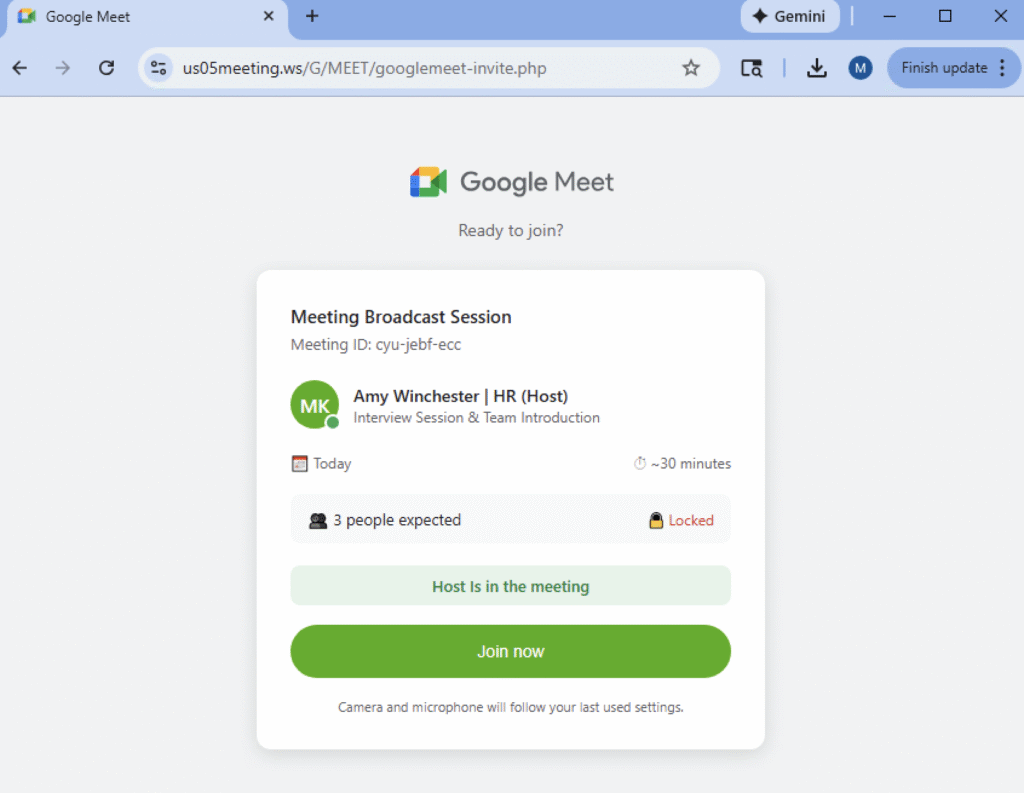
Netskope Threat Labs is currently tracking multiple phishing campaigns that leverage video conference call invitations as lures. In these campaigns, attackers impersonate well-known videoconferencing applications such as Zoom, Microsoft Teams, and Google Meet. To increase credibility, the phishing pages closely mimic legitimate pages, often displaying lists of participants who have “joined” the call. As victims attempt to join, they may see additional participants appear, further enhancing the illusion of authenticity.

The hook: Software update trap
As victims attempt to join the call, they are presented with a notification indicating that their application is out of date or incompatible. To proceed, victims must download and execute a provided “update” before being allowed to join. By framing the malicious payload as a critical technical fix for a legitimate business task, attackers increase the likelihood that users will manually bypass security warnings in order to avoid missing the session.

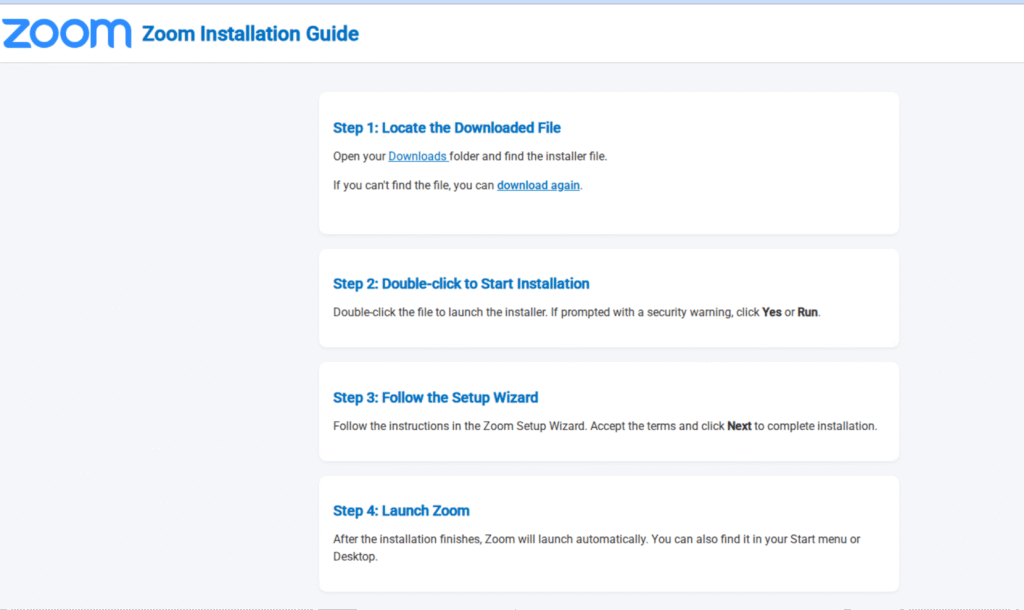
Some phishing sites even provide steps on how to “install” the software update, as shown in the image below.
The payload: Digitally signed RMM agents
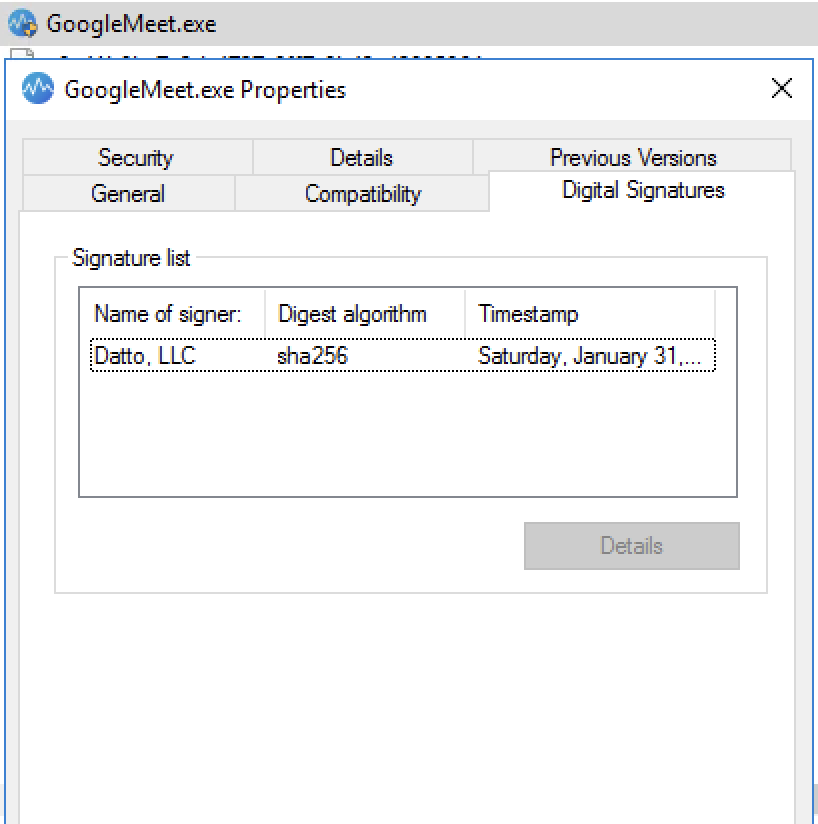
Once the victim agrees to the “software update,” they download a digitally signed executable or MSI installer. To maintain the deception, these binaries are renamed to match the expected platform, using names like GoogleMeeet.exe or ZoomWorkspaceinstallersetup.msi. From the phishing campaigns Netskope Threat Labs investigated, we identified LogMeIn Unattended, Datto, and ScreenConnect as the primary RMM agents used as payloads. By deploying legitimate, digitally signed RMM tools rather than custom malware, the attackers can blend in with standard corporate traffic. These tools can be pre-approved in enterprise environments, allowing the attackers to bypass signature-based security controls and gain a persistent administrative foothold without raising immediate alarms.
Once attackers gain privileged access, they have a wide array of post-exploitation options at their disposal. By leveraging the native, legitimate features of these RMM agents—such as file transfer, remote shell, and screen sharing—they can silently collect sensitive information or move laterally through the victim’s network to identify high-value targets. Most critically, because these tools are designed for mass software deployment, attackers can use the RMM’s own infrastructure to push more potent malware across the entire environment with ease, turning a single compromised endpoint into a full-scale corporate breach.
Conclusions
Netskope Threat Labs is monitoring an active phishing campaign that exploits the high-frequency nature of virtual meetings. By weaponizing fake video conference invites as a primary lure, attackers leverage the “mandatory software update” as a powerful psychological hook to coerce users into executing malicious payloads. This sophisticated chain of events leads to the deployment of legitimate, digitally signed remote monitoring and management (RMM) tools. By gaining this administrative foothold, attackers bypass traditional security filters and secure a persistent platform for severe post-exploit actions, ranging from sensitive data collection to the mass delivery of ransomware.
IOCs
All the IOCs and scripts related to this malware can be found in our GitHub repository.


 Read the blog